
By Leo Antony Raj, Senior Trainer, Systech Group 20+ years in networking and cybersecurity · Updated November 2026.
7 Min read
In short
To prevent ARP spoofing and man-in-the-middle attacks on a Cisco Catalyst 3850 switch, configure Dynamic ARP Inspection (DAI) with DHCP Snooping to validate IP-to-MAC address mappings and block suspicious ARP packets. Keep user-facing ports untrusted, configure trusted interfaces carefully, and use ARP ACLs for static-IP devices. Verify the configuration using Cisco IOS XE commands and test legitimate network traffic before deploying it in production.
Table of Contents
Introduction
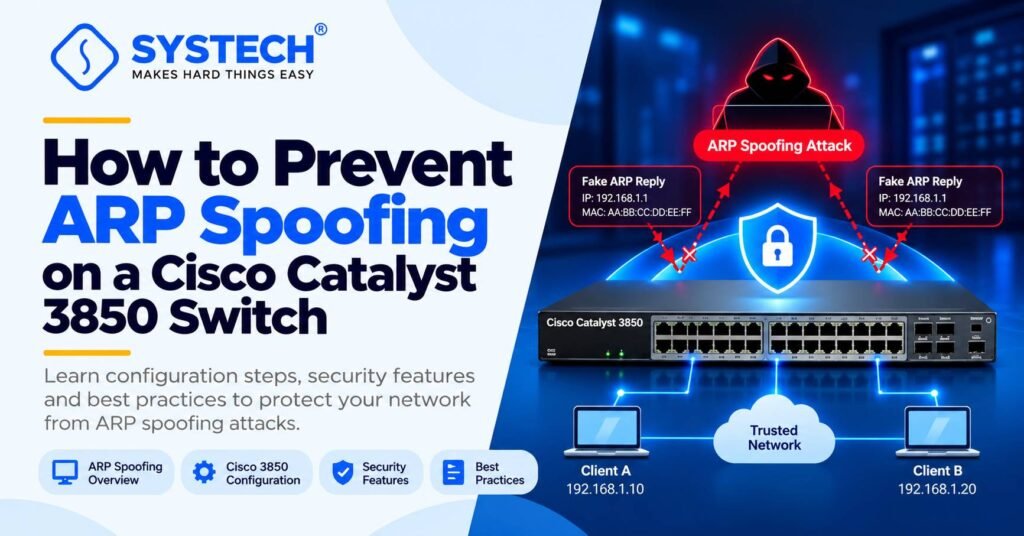
ARP spoofing is a network attack in which an attacker sends fake Address Resolution Protocol (ARP) messages to connect their device to another device’s network traffic. This can allow the attacker to intercept sensitive information, disturb network communication or perform a man-in-the-middle (MITM) attack.
If you are using a Cisco Catalyst 3850 switch and do not have a firewall available, you can use the switch’s built-in security features to reduce this risk. The primary feature to configure is Dynamic ARP Inspection (DAI), supported by DHCP Snooping or ARP Access Control Lists (ACLs) for networks that use static IP addresses. Cisco documents DAI specifically for the Catalyst 3850 platform. For practical networking knowledge, explore our Networking Course in Coimbatore to learn more about network security and switch configuration.
This guide explains how ARP spoofing works, how to configure the required security features, which commands to use for verification, and how to troubleshoot common configuration problems.
What is ARP spoofing?
The Address Resolution Protocol (ARP) helps a device find the MAC address associated with an IPv4 address on its local network.
For example, when a computer wants to communicate with its default gateway, it needs the gateway’s MAC address. It sends an ARP request, and the device that owns the requested IP address normally responds with its MAC address.
The problem is that traditional ARP does not authenticate these messages. An attacker on the same local network can send false ARP replies that claim to associate another device’s IP address with the attacker’s MAC address.
How an ARP spoofing attack works
When the victim accepts the false information, it may send traffic to the attacker’s MAC address instead of the legitimate gateway’s MAC address. If the attacker forwards that traffic, the communication can continue while the attacker attempts to inspect or alter it.
This is one way an ARP spoofing attack can become a man-in-the-middle attack.
What is the difference between ARP spoofing and a man-in-the-middle attack?
ARP spoofing is one technique that can be used to perform a man-in-the-middle attack. DAI helps prevent this technique within the VLANs where it is correctly configured, but it does not stop every type of MITM attack.
Why should you enable Dynamic ARP Inspection on a Cisco Catalyst 3850?
Dynamic ARP Inspection (DAI) checks incoming ARP packets on untrusted switch interfaces before allowing them to pass. It compares the IP and MAC address information in these packets against trusted information, normally learned through DHCP Snooping.
If an ARP packet contains an invalid IP-to-MAC address combination, DAI can drop it and log the event.
DAI is useful because it:
Helps block forged ARP requests and replies.
Reduces the risk of ARP cache poisoning.
Helps protect hosts against certain Layer 2 man-in-the-middle attacks.
Provides visibility into dropped ARP packets for troubleshooting.
Works on supported Catalyst 3850 configurations without requiring a separate firewall for this specific protection.
However, DAI is not a complete replacement for a firewall. It does not provide general traffic filtering, application inspection or protection against all network attacks.
What is the role of DHCP Snooping?
DHCP Snooping is a switch security feature that monitors DHCP messages and builds a binding database containing information such as a device’s IP address, MAC address, VLAN and switch interface.
DAI can use this database to determine whether an ARP packet contains a valid IP-to-MAC address combination. Cisco identifies DHCP Snooping as the normal foundation for DAI in DHCP-based networks.
For a network that assigns addresses dynamically, DHCP Snooping and DAI are the normal starting point. For devices with manually configured IP addresses, you must plan how their bindings will be validated before enabling enforcement.
How to configure Dynamic ARP Inspection on a Cisco Catalyst 3850 switch
The following example demonstrates a basic configuration for a DHCP-based network.
These are example values for a lab. Replace the VLAN, subnet and interfaces with the values from your own network. Confirm your IOS XE release and existing configuration before applying commands.
Step 1: Check the current switch configuration
Connect to the switch CLI and run:
enable
show version
show vlan brief
show interfaces status
show running-config
Confirm the switch software version, VLAN assignment, interface status and existing security configuration. Save a copy of the current configuration before making changes.
Step 2: Enable DHCP Snooping
Enter global configuration mode and enable DHCP Snooping for the required VLAN.
configure terminal
ip dhcp snooping
ip dhcp snooping vlan 10
Next, configure the interface that leads to the legitimate DHCP server or trusted DHCP-server path.
interface GigabitEthernet1/0/48
ip dhcp snooping trust
exit
Important: Trust only interfaces where legitimate DHCP server messages are expected. Do not mark ordinary client-facing ports as trusted. If the DHCP server is connected through another switch, confirm the entire DHCP path and the corresponding trust configuration before deployment.
Step 3: Enable Dynamic ARP Inspection
Enable DAI on VLAN 10:
ip arp inspection vlan 10
By default, DAI treats interfaces as untrusted. This is important because ARP packets arriving on untrusted interfaces are checked, while ARP packets arriving on trusted interfaces bypass those checks.
Step 4: Keep user-facing interfaces untrusted
For example, the port connected to an ordinary client should remain untrusted:
interface GigabitEthernet1/0/10
no ip arp inspection trust
exit
The explicit no ip arp inspection trust command returns the interface to its untrusted state. This is the intended configuration for a normal user-facing port.
Do not trust every uplink automatically. A trusted DAI interface can pass ARP packets without the normal DAI checks, so the trust boundary must be planned carefully.
Step 5: Add additional ARP validation checks
You can enable additional checks for malformed or inconsistent ARP packet fields:
ip arp inspection validate src-mac dst-mac ip
These checks validate the source MAC address, destination MAC address and IP address fields in ARP packets. Test them against legitimate network traffic and your software release before applying them in production.
After validating that DHCP and ARP traffic work as expected:
end
copy running-config startup-config
This saves the running configuration to the startup configuration.
Configuration reminder: These commands are a starting example, not a universal paste-and-run configuration. Existing DHCP Snooping settings, VLANs, switch trunks, static-IP hosts and software-release differences must be checked before deployment.
How to verify Dynamic ARP Inspection on a Cisco Catalyst 3850
After configuring DHCP Snooping and DAI, verify that the switch is learning valid bindings and inspecting the correct VLANs.
Use these Cisco IOS XE commands:
show ip dhcp snooping
show ip dhcp snooping binding
show ip arp inspection vlan 10
show ip arp inspection interfaces
show ip arp inspection statistics vlan 10
show running-config
Check the output against your intended configuration. The exact output fields can vary by IOS XE release. Cisco documents these commands in its Catalyst 3850 DAI configuration guide.
What if the network uses static IP addresses?
This is an important point that many introductory tutorials overlook.
DAI normally uses the DHCP Snooping binding database to validate ARP packets. A device configured with a manually assigned IP address might not have a corresponding DHCP Snooping entry.
If you enable DAI without planning for those devices, legitimate ARP packets may be dropped.
Cisco supports ARP ACLs for networks where static-IP hosts need explicit IP-to-MAC validation.
arp access-list VLAN10-STATIC-HOSTS
permit ip host 192.168.10.20 mac host aaaa.bbbb.cccc
The example represents a static host using IP address 192.168.10.20 and MAC address aaaa.bbbb.cccc. Replace these values with the actual approved device information.
You must then apply the ACL to the relevant VLAN using the appropriate DAI filter command:
ip arp inspection filter VLAN10-STATIC-HOSTS vlan 10
Important: Validate the complete ARP ACL syntax against your Catalyst 3850 software release and test the policy before deployment. An ACL can take precedence over DHCP Snooping bindings, and a configured ACL that denies a packet can cause that packet to be dropped even when a DHCP binding exists. Plan the permitted bindings for the entire VLAN, including DHCP clients and static hosts, before enforcing the ACL.
Common Dynamic ARP Inspection problems and solutions
Do not respond to every dropped ARP packet by trusting the interface. First determine whether the packet is legitimate, whether the binding database is complete and whether the trust boundary is correct.
Not sure which route fits you?
Tell us your stream and what you are hoping for, and we will tell you honestly which option suits.
Get course detailsAdditional security measures for a Cisco Catalyst 3850 switch
DAI should be part of a broader Layer 2 security plan rather than the only security control.
IP Source Guard: Helps prevent IP source-address spoofing on supported access ports.
Port security: Limits which MAC addresses can use an access port.
DHCP Snooping: Helps prevent unauthorized DHCP servers from providing addresses to clients.
VLAN segmentation: Keeps devices in appropriate broadcast domains and reduces unnecessary exposure.
Secure management access: Use SSH, appropriate administrative permissions and controlled management access.
Monitoring and logging: Review security events, unexpected MAC address changes and dropped ARP packets.
Cisco includes DHCP Snooping, IP Source Guard and DAI among its integrated switch security features. These features address different risks and work best when designed together.
Learn Cisco networking and network security at Systech Group
Understanding ARP spoofing, DHCP Snooping, Dynamic ARP Inspection and IP Source Guard helps networking learners develop practical network troubleshooting and security skills.
At Systech Group, learners can explore networking concepts through the CCNA course in Trichy, which covers switching, network security and hands-on Cisco networking practice.
Those interested in a wider security path can also explore the cybersecurity course in Trichy to learn about network threats, security tools and defensive techniques.
Build your understanding of Cisco switches, network security and real-world troubleshooting through structured learning and practical lab work.
Frequently asked questions
Which feature prevents ARP spoofing on a Cisco Catalyst 3850 switch?
Dynamic ARP Inspection (DAI) is the primary switch feature for mitigating ARP spoofing. In a DHCP-based network, it normally uses DHCP Snooping bindings to validate ARP packets.
Can I configure DAI without a firewall?
Yes. DAI is a switch security feature and does not require a separate firewall to inspect ARP traffic. However, it is not a replacement for a firewall’s broader security functions.
Is DHCP Snooping required for Dynamic ARP Inspection?
DHCP Snooping is the normal source of trusted IP-to-MAC bindings for DAI in DHCP-based networks. For static-IP environments, Cisco supports ARP ACLs to define valid bindings.
Does DAI stop every man-in-the-middle attack?
No. DAI helps block ARP spoofing within correctly configured VLANs. It does not prevent every possible MITM attack, such as attacks involving compromised endpoints, malicious applications or other interception methods.
How do I check whether DAI is working?
Use show ip arp inspection vlan 10, show ip arp inspection interfaces and show ip arp inspection statistics vlan 10, replacing VLAN 10 with your actual VLAN ID. Also check DHCP Snooping bindings and logs.
Should I configure DAI on every VLAN?
Enable it on each VLAN that needs this protection after reviewing its DHCP design, static-IP devices, trusted interfaces and network topology. Do not enable it blindly across production VLANs without validating legitimate ARP traffic.
Does DAI work on every switch in a network automatically?
No. DAI must be supported and configured on the relevant switches and VLANs. If another switch in the same Layer 2 broadcast domain does not perform the required checks, the overall protection may be incomplete.

Written by
Leo Antony Raj
Senior Trainer · Networking, Cyber Security and Cloud
Leo Antony Raj has over 20 years of hands-on experience in hardware, networking, server configuration, ethical hacking and cloud computing. He has trained more than 10,000 students, and he teaches networking first, because every security and cloud role is built on it.