
By Arjun Kumar, Senior Trainer, Systech Group 15+ years in Network Security and Cloud Architecture · Updated November 2026.
9 min read
In short
The VLAN deletion problem occurs when an unverified backup switch with a higher VTP configuration revision number introduces an incorrect VLAN database into a compatible VTP version 1 or 2 domain. To prevent this, check the VTP revision number, domain, operating mode, and VLAN database before connecting the switch. Use VTP transparent mode during preparation, maintain VLAN configuration backups, and consider VTP version 3 where supported. Always verify VLANs and network connectivity after making changes.
Introduction
Imagine a company with 50 Cisco switches and multiple VLANs for departments such as HR, Finance, Sales, IT, and Servers. The network has been working properly for months. One day, an administrator connects a backup switch to replace a faulty device. Shortly after the connection, existing VLANs disappear from several switches, and employees lose access to network resources.
Why did this happen?
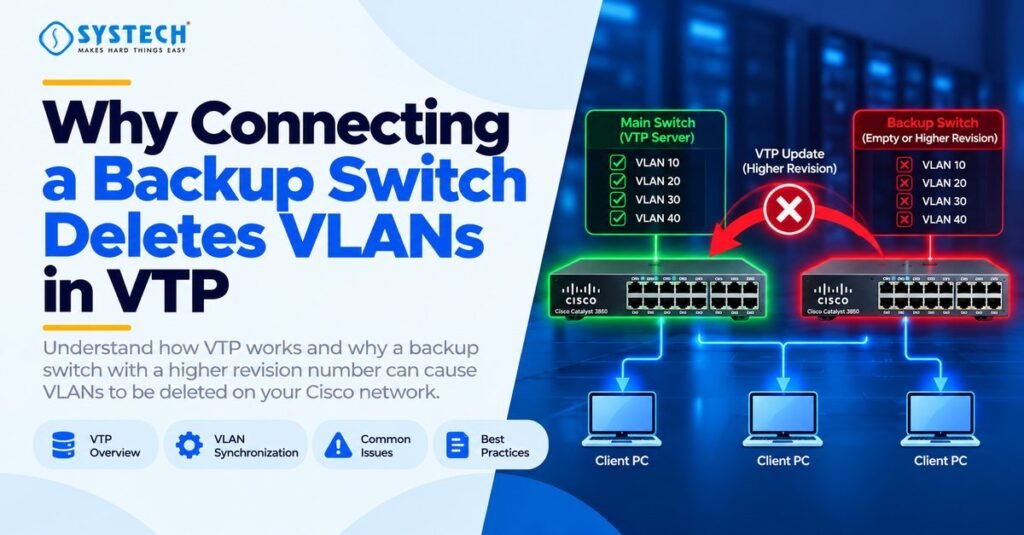
One possible cause is an incorrect VTP configuration revision number on the backup switch. In networks using VTP version 1 or 2, a switch with a higher revision number can cause other compatible switches in the same VTP domain to accept its VLAN database. If that database does not contain the required VLANs, existing VLANs can be removed from the network.
Understanding this problem is important for network administrators who manage Cisco switches, VLANs, and trunk links. Learners who want to build practical networking skills can also explore the CCNA course in Trichy to strengthen their understanding of switching, VLAN configuration, and network troubleshooting.
In this guide, we will explain how VTP works, why an unverified backup switch can cause VLAN loss, which commands help identify the problem, and how to prevent it in a production network.
What Is VTP in Cisco Networking?
VTP stands for VLAN Trunking Protocol. It is a Cisco protocol that helps distribute VLAN configuration information between compatible switches in the same VTP domain.
Without VTP, administrators may need to create and manage VLANs individually on multiple switches. In a suitable VTP deployment, VLAN changes can be distributed automatically, reducing repetitive configuration work.
For example, a company may use the following VLANs:
VTP can help distribute information about these VLANs to compatible switches. However, it does not automatically configure every part of the network. Administrators must still verify access ports, trunk links, IP addressing, and routing where required.
How Does VTP Work?
VTP uses advertisements to communicate VLAN configuration information between participating switches.
The main VTP operating modes are:
- VTP Server: Can create, modify, and delete VLANs and advertise VLAN database changes.
- VTP Client: Receives and applies VLAN information according to the supported VTP version and configuration.
- VTP Transparent: Maintains its own VLAN configuration rather than synchronising its VLAN database with received VTP advertisements. Advertisement forwarding depends on the VTP version and platform.
- VTP Off: Available on supported platforms and releases; it disables VTP participation and advertisement forwarding as defined by that implementation.
VTP advertisements are exchanged over appropriate trunk connections. Switches must have compatible settings for the expected information exchange to take place.
Why Does Connecting a Backup Switch Delete Existing VLANs?
The main cause in this scenario is a higher VTP configuration revision number on the backup switch.
The VTP configuration revision number is a counter used to identify the relative version of the VLAN configuration. It is not the switch’s age, hardware version, or Cisco IOS software version.
Consider the following example:
Assume the production network uses VTP version 2 and the switches have matching VTP domain settings.
When the backup switch connects through a trunk, its VLAN information may be advertised with revision number 42. Because this number is higher than 25, compatible switches may accept its VLAN database.
If that database does not contain the required production VLANs, those VLANs can disappear from the affected switches.
The important point is that VTP uses configuration revision information; it does not know whether the backup switch contains the VLANs that the administrator intended to preserve.
A higher revision number does not guarantee VLAN deletion in every situation. The VTP version, domain, authentication settings, operating mode, and platform behaviour must also be considered.
What Happens When the Backup Switch Is Connected?
The incident can be understood through five steps.
Step 1: The production network is working normally.
The existing switches contain the required VLANs and are exchanging VTP information.
Step 2: An unverified backup switch is connected.
The switch may contain an old or incomplete VLAN database and a higher configuration revision number.
Step 3: The switches exchange VTP advertisements.
Compatible switches in the same domain compare the received VLAN configuration information.
Step 4: The unwanted VLAN database is accepted.
Under the relevant VTP version and configuration, the higher-revision VLAN database may replace the expected VLAN information.
Step 5: Network connectivity is affected.
Ports assigned to missing VLANs may no longer provide the expected connectivity. Users may lose access to servers, applications, and other network resources.
This is why administrators should never connect an unverified backup switch directly to a production network.
What Is a VTP Configuration Revision Number?
A VTP configuration revision number identifies changes to the VLAN database within the relevant VTP domain.
Think of it as a version number for the VLAN configuration.
For example:
- Revision 10 represents an earlier VLAN configuration.
- Revision 18 represents a later configuration.
- Revision 42 represents a higher revision, but not necessarily the correct VLAN database.
A higher number does not mean that the switch is newer, more secure, or correctly configured. It indicates a higher configuration revision in the relevant VTP context.
Why Is an Old Backup Switch Dangerous?
A backup switch may have been used in a different office, training lab, or previous network. Even if the switch looks unused, its configuration may still contain:
- An old VTP domain name.
- A high configuration revision number.
- VLANs from a previous environment.
- An incomplete or incorrect VLAN database.
- Old VTP operating mode and authentication settings.
If the switch is connected without inspection, it may introduce unwanted VLAN information into a compatible VTP version 1 or 2 domain.
The problem is not simply that the switch is old. The problem is that its existing configuration has not been verified.
How to Verify Whether VTP Caused the VLAN Deletion
Before making changes, inspect the affected switches and collect evidence. Do not immediately reset switches or delete configuration files.
Step 1: Check the VTP Status
Run the following command on the affected switch and the backup switch:
Switch# show vtp status
Review these fields:
Compare the output from the backup switch with the output from a known-good switch or your approved network records.
Step 2: Check the VLAN Database
Run:
Switch# show vlan brief
This command displays the VLANs known to the switch and their status.
Look for missing VLAN IDs, incorrect VLAN names, or unexpected differences between switches.
For example, if VLANs 10, 20, 30, 40, and 50 existed previously but only the default VLANs remain, investigate when and how the change occurred.
Step 3: Check the Trunk Links
Run:
Switch# show interfaces trunk
Identify the trunk interfaces and determine which connection links the backup switch to the production network.
You can also inspect the relevant interface configuration:
Switch# show running-config interface GigabitEthernet1/0/1
Replace the interface identifier with the actual interface on your switch.
Step 4: Compare the Results
The following combination supports the VTP revision mismatch explanation:
- The backup switch has a higher revision number.
- Its VTP domain and other relevant settings allow the expected VTP exchange.
- Its VLAN database does not contain the required production VLANs.
- The production VLANs disappeared after the switch was connected.
If these details do not match, investigate other possible causes, such as manual VLAN deletion, configuration changes, or platform-specific behaviour.
For practical switching and network troubleshooting knowledge, learners can also explore CCNA training in Coimbatore, which covers core Cisco networking concepts.
How to Prevent VLAN Deletion When Connecting a Backup Switch
The safest approach is to treat every replacement switch as an unverified device until its configuration has been checked.
1. Inspect the Backup Switch Before Connecting It
Keep the backup switch disconnected from production while inspecting its configuration.
Access it through the console or an isolated test environment. Check the VTP settings, VLAN database, and revision number before connecting it to any production trunk.
This simple step can prevent an unnecessary network outage.
2. Check the VTP Revision Number
Run:
Switch# show vtp status
For VTP versions 1 and 2, Cisco’s guidance is to ensure that a switch being added has a lower revision number than the existing switches in the domain.
However, do not depend on the revision number alone. Also verify the VLAN database, VTP domain, operating mode, and authentication settings.
3. Use VTP Transparent Mode During Preparation
On a supported Cisco switch, you can place the backup switch in transparent mode before preparing its VLAN configuration.
Example:
Switch# configure terminal
Switch(config)# vtp mode transparent
Switch(config)# end
Switch# show vtp status
Confirm that the switch has entered the intended mode before proceeding.
In transparent mode, the switch maintains its own VLAN database instead of synchronising that database with received VTP advertisements. Depending on the VTP version and platform, it may still forward advertisements.
Therefore, transparent mode is a preparation measure, not a substitute for checking the full configuration.
4. Consider VTP Version 3 Where Supported
VTP version 3 prevents the specific VLAN-erasure scenario caused by connecting a higher-revision switch under VTP versions 1 and 2.
It also introduces primary-server controls for VLAN database changes.
Before migrating, verify hardware and software support, authentication settings, domain configuration, and the intended primary server. Do not change VTP versions across a production network without a documented migration plan.
5. Verify the VTP Domain and Authentication Settings
Check that the backup switch has the intended VTP domain name and authentication configuration.
A domain mismatch normally prevents the expected VTP synchronisation. However, a domain mismatch should not be treated as the only protection against accidental VLAN loss.
The safest approach is to use a verified configuration and a controlled onboarding process.
6. Back Up the VLAN Database and Switch Configuration
Before changing production network settings, preserve the current VLAN information and switch configuration.
Useful inspection commands include:
Switch# show running-config
Switch# show vlan brief
Switch# show vtp status
Switch# show interfaces trunk
Save the output in a secure location and follow your organisation’s approved backup procedure.
A running configuration backup alone may not contain everything required to reconstruct a VTP-managed VLAN database, so save the VLAN information separately as well.
7. Use a Switch Replacement Checklist
Before connecting any backup switch to production, confirm the following:
- The VTP version and domain have been checked.
- The revision number and VLAN database have been inspected.
- The intended VTP operating mode has been configured.
- Trunk settings have been verified.
- The expected VLAN IDs and names have been recorded.
- The change has been approved.
- Connectivity and VLAN status will be checked after connection.
This checklist makes switch replacement safer and easier to repeat.
What to Do If the VLANs Have Already Been Deleted
If VLANs have disappeared, avoid making further configuration changes until you understand the current state.
Step 1: Isolate the Suspected Backup Switch
Follow your organisation’s incident procedure to disconnect or isolate the suspected device safely. Make sure you do not disconnect unrelated production links.
Do not reconnect the backup switch until its VTP configuration has been reviewed.
Step 2: Check the Remaining VLAN Information
Run:
Switch# show vlan brief
Switch# show vtp status
Switch# show interfaces trunk
Identify the affected switches, the missing VLANs, and any known-good VLAN database or configuration backup.
Step 3: Restore the Approved VLAN Configuration
Use the organisation’s saved VLAN information to determine the correct VLAN IDs, names, and required configuration.
If VTP version 1 or 2 distributed an unwanted VLAN database, reconnecting a switch with a lower revision number will not necessarily restore the original configuration.
Use a platform-appropriate recovery procedure and verify that the expected VLANs have been restored.
Do not delete the vlan.dat file, reset revision information, or change the VTP domain on a production switch without understanding the effects and having a recovery plan.
Step 4: Verify Network Connectivity
After restoration, confirm that:
- All required VLANs exist.
- Access ports use the correct VLANs.
- Trunk links allow the required VLANs.
- Inter-VLAN routing works where needed.
- Users can access the required servers and applications.
- The VTP status matches the approved network design.
Step 5: Document the Incident
Record the affected switches, VTP versions, revision numbers, observed changes, and recovery actions.
This information helps identify the cause and prevents the same problem during future switch replacements.
How Do VTP Versions 1, 2, and 3 Differ?
The VTP version is important because the backup-switch scenario does not have the same consequences across all versions.
VTP version 3 is a useful option for supported environments that require VTP. Administrators must still follow the platform’s configuration requirements and use a controlled change process.
How Is VTP Related to Network Security?
VTP is a network administration protocol, but incorrect configuration can create an availability problem.
When VLANs disappear, employees may lose access to servers, applications, printers, and other network resources. A configuration error can therefore affect business operations even when no attacker is involved.
Network administrators should control access to switches, restrict management access, review trunk connections, back up configurations, and monitor unexpected network changes.
For readers who want to understand the wider protection of enterprise networks, the Cyber Security course in Chennai is a relevant next step for learning about network security and defensive practices.
Not sure which route fits you?
Tell us your stream and what you are hoping for, and we will tell you honestly which option suits.
Get course detailsHow Can Ethical Hacking Help Identify Network Misconfigurations?
Ethical hacking involves identifying weaknesses in systems and networks through authorised testing.
A security assessment may examine whether only approved devices can access network infrastructure, whether management interfaces are protected, and whether configuration changes are logged and monitored.
Understanding switching, VLANs, and network access provides a useful foundation for these activities. Ethical hacking and VTP troubleshooting are different tasks, but both benefit from a clear understanding of network behaviour and the risks caused by misconfiguration.
Conclusion
Connecting an unverified backup switch can cause VLAN loss because VTP versions 1 and 2 may accept a VLAN database from a switch with a higher configuration revision number, even when that database does not contain the required production VLANs.
The best prevention is to inspect every backup switch before connecting it, verify its VTP domain and revision number, check the VLAN database, maintain reliable backups, and consider VTP version 3 where supported.
Network administrators should treat every replacement switch as a configuration risk until its settings have been verified. Understanding this behaviour is an important part of Cisco switching, VLAN management, and network troubleshooting.
Readers who want to strengthen their understanding of Cisco switching, VLANs, trunking, and practical network troubleshooting can explore the CCNA course in Coimbatore and build a stronger foundation for managing enterprise networks.
Frequently asked questions
Why can connecting a backup switch delete VLANs in VTP?
With VTP versions 1 and 2, a switch with a higher configuration revision number can cause compatible switches in the same domain to accept an unwanted VLAN database, potentially removing existing VLANs.
Which command displays the VTP configuration revision number?
Use show vtp status. This command displays the VTP version, domain, operating mode, and configuration revision number.
Does VTP version 3 prevent this problem?
Yes. VTP version 3 prevents the specific VLAN-erasure scenario caused by connecting a higher-revision switch under VTP versions 1 and 2. Correct configuration and safe switch onboarding remain important.
Is VTP transparent mode safe for a backup switch?
Transparent mode is useful during preparation because the switch maintains its own VLAN database rather than synchronising it with received VTP advertisements. However, forwarding behaviour depends on the version and platform, so additional configuration checks are necessary.
Can deleted VLANs be recovered?
Yes, if the required VLAN information can be reconstructed or restored from a known-good backup. The recovery procedure depends on the switch model, VTP version, remaining configuration, and network design.
Does a different VTP domain name prevent synchronisation?
A domain mismatch normally prevents the expected VTP synchronisation. However, domain mismatch should not be the only safeguard against VLAN loss.
Should every enterprise network use VTP?
No. VTP can simplify VLAN management, but it also introduces configuration dependencies. Organisations should decide whether to use VTP or manually managed VLAN configurations based on network requirements, platform support, and operational risk.