
By Arjun Kumar, Senior Trainer, Systech Group 15+ years in Network Security and Cloud Architecture · Updated October 2026.
9 min read
In short
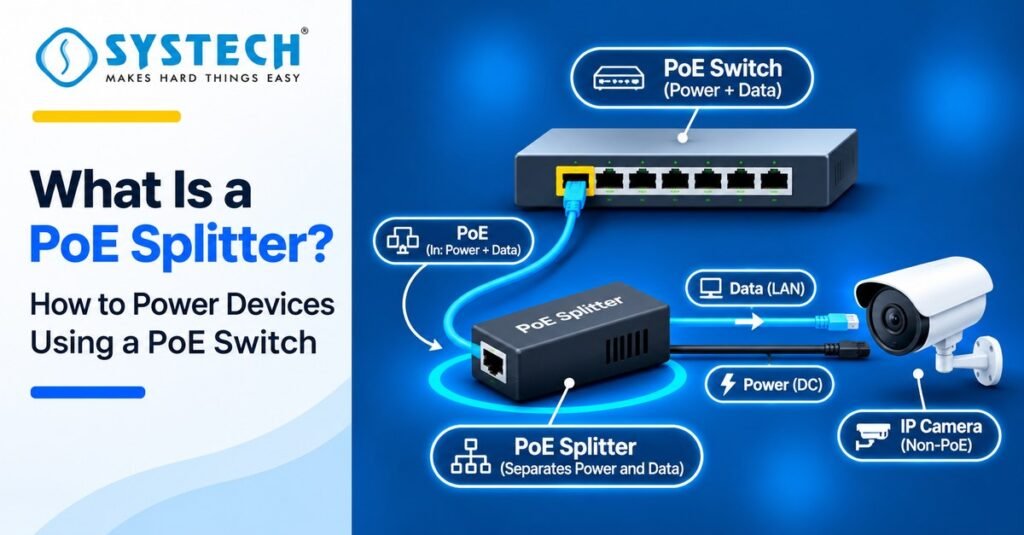
A PoE splitter is a device that separates power and data from a Power over Ethernet cable, so a non-PoE device can get DC power and network data from the same cable.
Power over Ethernet (PoE) means an Ethernet cable carries electric power along with data. A PoE switch or a PoE injector puts the power on the cable. The PoE splitter sits at the other end and takes the power out.
Table of Contents
In simple words:
Input: one Ethernet cable with PoE (power and data)
Output 1: an RJ45 port for data. You plug this into the LAN port of your device
Output 2: a DC plug for power. Common outputs are 5V, 9V, 12V and 24V
What it does not do: it does not make power. It only takes power that a PoE switch or injector already sends
Do You Need a PoE Splitter When There Is No Power Socket Near Your Device?
Think about a CCTV camera fixed on a wall outside a shop. The network switch is inside, 50 metres away. The nearest power socket is also inside. To power the camera, you now have two options.
- Run a separate power cable, and often call an electrician. This costs time and money, and it is not safe outdoors.
- Use one Ethernet cable for both data and power, and use a PoE splitter at the camera end.
The second option is cleaner. It needs one cable, one switch and one small splitter. An Ethernet cable can run up to 100 metres (328 feet), so the device does not need a power socket at all.
This is also why PoE is a core skill for anyone who installs networks. If you want to learn cabling, switches and routers from the basics, a hardware and networking course in Trichy covers cable crimping, switches and routers in a practical lab.
How Does a PoE Splitter Work With a PoE Switch?
Power and data on one cable
An Ethernet cable has eight wires, arranged as four pairs. Fast Ethernet (10/100 Mbps) uses only two pairs for data. The other two pairs are free, so they can carry power. Gigabit Ethernet uses all four pairs for data. In this case, the power rides on the same pairs as the data, and the data is not disturbed.
A PoE switch sends around 48V DC down the cable. A good PoE switch does not just push power blindly. It first checks if the other end is a PoE device. The PoE splitter gives a small signal that says, “I am a PoE device, send power.” Only then does the switch turn on the power. This is why a normal laptop is safe on a PoE port.
Data output and DC power output
Here is what happens inside the PoE splitter, step by step:
- The PoE cable comes into the input port.
- The splitter separates the power from the data.
- The power goes to a converter that steps down the high voltage (about 48V) to a safe, low DC voltage like 5V, 9V or 12V.
- The data goes straight to the RJ45 output port.
You then connect the RJ45 port to your device’s LAN port, and the DC plug to your device’s power input. A small part of the power is lost as heat in the converter, so a splitter always gives a little less power than the switch port sends. Keep this in mind when you choose one.
Which PoE Splitter Do You Need: 5V, 9V, 12V or 24V?
The type of PoE splitter is mostly decided by its DC output voltage. Your device label tells you the voltage it needs. Match it exactly.
Some splitters let you switch between 5V, 9V and 12V with a small switch on the body. These are good for labs, where you test many different devices.
Active or Passive PoE Splitter: Which Is Safer for Your Device?
This is the part many beginners miss.
An active PoE splitter follows the IEEE standards (802.3af or 802.3at). It talks to the PoE switch, shows the “I am a PoE device” signal, and then gets power. It works with any standard PoE switch or injector.
A passive PoE splitter does not talk to anything. It just takes whatever voltage arrives on the cable and converts it. It works only with passive PoE sources, which send a fixed voltage all the time.
The risk is simple. If you plug a passive splitter into a standard PoE switch, the switch may never send power, because it never sees the signal. If you connect a passive PoE source to a device that is not ready for it, you can burn the device. So always check that your splitter and your power source are the same kind.
Fast Ethernet or Gigabit PoE Splitter: Which One Do You Need?
A Fast Ethernet splitter supports speeds up to 100 Mbps. It is cheaper and is fine for most basic cameras.
A gigabit PoE splitter supports up to 1000 Mbps. Use it for access points, modern cameras with high-resolution video, and any link where speed matters. If your device has a gigabit port and you use a 100 Mbps splitter, the link will drop to 100 Mbps.
Best PoE Splitter in India: Price, Budget and Branded Options
The price of a PoE splitter in India depends on speed, standard and output options. Here are three common choices. The prices below are approximate and change by seller, so check the latest price before you buy.
The TP-Link TL-POE10R is a good start for most people. It is 802.3af compliant, supports gigabit speed and lets you pick the output voltage. The Edimax GP-101ST costs more, but it supports the higher 802.3at (PoE+) power, so it suits devices that need more watts.
Which one should you buy?
- One basic IP camera, small budget: a 10/100 active splitter with 12V output
- Wi-Fi access point or a camera with high-resolution video: a gigabit splitter like the TL-POE10R
- A device that needs more power, or a Raspberry Pi 4/5: a PoE+ (802.3at) gigabit splitter like the Edimax GP-101ST
- A lab with many different devices: any splitter with selectable 5V / 9V / 12V output
The cheap modules are fine for a basic 12V camera, but read the product page carefully. Many are passive and made for a fixed 48V source. If you use them with a standard PoE switch, they may not get any power at all.
Best PoE splitter under ₹500
At this budget you can only buy a basic 10/100 Mbps splitter, which costs about ₹210 to ₹318. It is fine for one simple IP camera with a 12V input. Check two things before you buy: the output voltage, and whether it is active (802.3af) or passive. If you use a standard PoE switch, buy the active one.
Best PoE splitter under ₹1,000
The popular gigabit splitter, TP-Link TL-POE10R, is listed at around ₹1,039 to ₹1,299, so it is just above this budget. Prices change with sales and sellers, so check before you give up on it. If ₹1,000 is your hard limit, choose an active 802.3af splitter with 10/100 speed. It works well for cameras that do not need gigabit.
Best branded PoE splitter: TP-Link or Edimax?
Choose TP-Link TL-POE10R if you want gigabit speed and selectable 5V, 9V and 12V output at a mid price. Choose Edimax GP-101ST if your device needs more power, because it supports 802.3at (PoE+). Both are active splitters, so they work with standard PoE switches.
Best PoE splitter for a company, office or lab
For a company with many devices, pick a gigabit splitter with selectable voltage. One model can then power cameras, access points and test devices. Buy the PoE+ model if your switch has PoE+ ports and your devices need more than 12 W.
PoE Splitter vs PoE Injector vs PoE Switch: Which One Do You Need?
These three are often mixed up. The easiest way to remember: the switch and injector put power on the cable. The splitter takes power off the cable.
| Device | Where it sits | What it does | Ports |
|---|
There are two common setups:
- Setup 1: PoE switch → Ethernet cable → PoE splitter → non-PoE device
- Setup 2: Normal switch → PoE injector → Ethernet cable → PoE splitter → non-PoE device
Never connect a PoE splitter straight to a normal switch. A normal switch sends no power, so the splitter has nothing to split.
Best PoE Splitter for IP Camera, Access Point, VoIP Phone and Raspberry Pi
Best PoE splitter for IP camera and CCTV (12V)
A PoE splitter for IP camera setups is the most common use. Most cameras need 12V DC, so a 12V PoE splitter is the usual pick. Check the camera’s wattage first. Cameras with night-vision lights and motors draw more power. If you want to learn how IP cameras, PoE, IP addressing and remote viewing work in real jobs, this CCTV and networking course trichy teaches IP camera and PoE setup in a hands-on lab.
Best PoE splitter for a Wi-Fi access point
Access points sit high on walls and ceilings, where sockets are rare. A gigabit PoE splitter with 12V output is a common choice for access points that have a DC jack but no PoE.
PoE splitter for an older VoIP phone
An older IP phone with a DC input can get power and network from one cable on the desk, so you avoid a power adapter and extra wires.
Best 5V PoE splitter for Raspberry Pi and small boards
A 5V PoE splitter with a micro-USB or USB-C plug can power a Raspberry Pi. Check the current. Small boards are fine on a 5V 2A splitter, but a Raspberry Pi 4 or 5 may need more, so choose a PoE+ (802.3at) splitter with enough amps, or you may see under-voltage warnings.
PoE splitter with an LED bulb for lab practice
A DC LED bulb is the easiest way to see PoE working. The bulb lights up when the switch port sends power, and goes dark when the power stops. You will use this in the lab section below.
Which PoE Standard Should Your Splitter Support: 802.3af, 802.3at or 802.3bt?
PoE standards tell you how much power a switch port can send. They are written by IEEE.
| Standard | Also called | Max power from switch port | Power at the device |
|---|
Two things to remember:
- The device gets less power than the port sends, because some power is lost in the cable.
- The standard describes the switch and the PoE device. It does not tell you the splitter’s output voltage. A splitter that works on 802.3af can still output 5V, 9V or 12V. You choose the voltage by your device, not by the standard.
How to Choose a PoE Splitter for a 12V 1A Camera or Any Other Device
Go through this list before you buy:
- Voltage: Match your device exactly. A 12V device needs a 12V output. Wrong voltage can damage the device.
- Power (watts): Watts = Volts × Amps. A 12V device that needs 1A uses 12 W. An 802.3af port gives about 12.95 W at the device, and the splitter loses a little more, so this is too tight. Choose an 802.3at splitter and a PoE+ switch, or keep 20% extra room.
- Speed: Choose gigabit if your device has a gigabit port. Choose 10/100 only for basic cameras.
- Distance: Keep the Ethernet run under 100 metres.
- Source type: Use an active 802.3af/at splitter with a standard PoE switch. Use a passive splitter only with a passive source.
- Plug size and polarity: Check the DC plug size (many are 5.5 × 2.1 mm) and that the centre pin is positive, as your device needs.
- Place of use: For outdoor use, pick a waterproof model or put it in a weatherproof box.
PoE Splitter With a Cisco PoE Switch: Turn a Device On and Off With shutdown and no shutdown
This is the part you can try yourself, and it shows how PoE really works.
What you need: a PoE-capable switch (for example, a Cisco Catalyst PoE model), a PoE splitter, a DC LED bulb that matches the splitter output (for example, 12V), and Ethernet cables.
Connect it: switch port → Ethernet cable → PoE splitter input. Then connect the LED bulb to the splitter’s DC output.
Commands:
Switch> enable
Switch# configure terminal
Switch(config)# interface gigabitEthernet 0/1
Switch(config-if)# power inline auto
Switch(config-if)# no shutdown
When you type no shutdown, the port comes up, the switch sends power, and the LED bulb turns on.
Switch(config-if)# shutdown
When you type shutdown, the port goes down, the switch stops sending power, and the LED bulb turns off.
To see how much power each port is giving, use:
Switch# show power inline
Why this matters in real work: if an IP camera or access point hangs, you do not need to climb a pole. Just run shutdown and then no shutdown on that port, and the device restarts. If you want to turn off only the power but keep the port up, you can use power inline never on the port. Command names can differ a little by switch model, so check your switch guide.
How to Set Up a PoE Splitter Step by Step
- Check your device. Note the voltage, current and plug size on its label.
- Pick the splitter. Match voltage, watts, speed and source type from the checklist above.
- Set the output voltage. If the splitter has a voltage switch, set it first, before you connect anything.
- Test the output. Connect the splitter to the PoE switch and use a multimeter on the DC plug to confirm the voltage and polarity. Do this before you connect your device.
- Connect the device. Plug the DC output into the power input, and the RJ45 output into the LAN port.
- Verify. Check that the device powers on and gets a network link. Use show power inline on the switch to confirm the port is supplying power.
Not sure which route fits you?
Tell us your stream and what you are hoping for, and we will tell you honestly which option suits.
Get course detailsPoE Splitter Not Working? Common Problems and Fixes
| Problem | Likely reason | Fix |
|---|
Where Can You Learn PoE, CCTV and Networking Hands-On in Trichy?
A PoE splitter looks simple, but the skills behind it are real network skills: cabling, switch ports, power budgets, and commands on live devices. Employers ask about these skills, and you cannot learn them only from slides. You need a switch in front of you, a cable in your hand, and a device that must turn on.
Which networking course is best for beginners in Trichy? It depends on your goal. If you are a fresher after 12th, a diploma or engineering and want to start in IT support, begin with Hardware and Networking. If you want to install and fix CCTV and IP cameras, choose CCTV and Networking. If you want a network engineer path with Cisco, choose CCNA.
At Systech Group, training is built around practical labs. Here is how the courses connect to what you read in this guide:
- Hardware and Networking: cabling, crimping, switches and routers. This is the right start if you are new
- CCTV and Networking: IP cameras, PoE setup, IP addressing and remote viewing
- CCNA: switching, VLANs, routing and PoE concepts, with hands-on work on Cisco devices
If you enjoyed the shutdown and no shutdown lab above, the CCNA course in Trichy with practical Cisco labs is the natural next step. You will configure real Cisco switches and routers, not only read about them.
Not sure where to start? Talk to the Systech team. They can look at your goal, whether it is a job, a certificate or a CCTV business, and suggest the right course for you.
Frequently asked questions
Which is the best PoE splitter under ₹500?
Only basic 10/100 Mbps models fit under ₹500. They cost about ₹210 to ₹318. Choose one with 12V output for a simple IP camera. Check that it says 802.3af compatible if you use a PoE switch, because many of the cheapest ones are passive and will not get power from a standard PoE switch.
Which is the best PoE splitter under ₹1,000?
A good gigabit PoE splitter like the TP-Link TL-POE10R is listed at around ₹1,039 to ₹1,299, so it sits just above ₹1,000. Prices change by seller, so you may find it near that mark. If your limit is strict, pick an active 802.3af splitter with 10/100 speed. It is enough for most basic cameras.
Which is the best budget PoE splitter for an IP camera?
For one basic camera, a 12V active 10/100 Mbps splitter is the best budget choice. Check the camera’s watts first. A camera that uses 12 W is too much for a plain 802.3af port after losses, so pick a lower-power camera or an 802.3at splitter.
Which 12V PoE splitter should I buy for a CCTV camera in India?
Buy a 12V PoE splitter that gives at least the amps your camera needs. Multiply volts by amps to get watts. For a 12V 1A camera, that is 12 W, so an 802.3at (PoE+) splitter like the Edimax GP-101ST is safer than a basic 802.3af one. For outdoor use, keep the splitter in a weatherproof box.
Which is the best gigabit PoE splitter for a Wi-Fi access point?
For most access points, the TP-Link TL-POE10R is a good choice. It is 802.3af, gigabit, and has selectable 5V, 9V and 12V output. If your access point needs more power, choose an 802.3at gigabit splitter. If the access point already supports PoE, you do not need a splitter at all.
Which is the best 5V PoE splitter for Raspberry Pi?
Choose a 5V PoE splitter with a micro-USB or USB-C plug that matches your board. Older Pi models run well on 5V 2A to 2.5A. A Raspberry Pi 4 or 5 needs more current, so pick an 802.3at splitter with enough amps to avoid under-voltage warnings.
Is a cheap PoE splitter safe to use?
A cheap active (802.3af) splitter is generally safe. A cheap passive splitter is risky with the wrong voltage. Before you connect your device, use a multimeter to check the output voltage and polarity on the DC plug.
Is a cheap PoE splitter safe to use?
A cheap active (802.3af) splitter is generally safe. A cheap passive splitter is risky with the wrong voltage. Before you connect your device, use a multimeter to check the output voltage and polarity on the DC plug.
Which PoE splitter works best with a Cisco PoE switch for a lab?
Use an active 802.3af or 802.3at splitter with selectable 5V, 9V and 12V output, so one splitter can test many devices. Connect a DC LED bulb, then use no shutdown and shutdown on the port to turn it on and off. Use show power inline to see the power on each port.
How much should I spend on a PoE splitter in India?
Spend based on speed and power, not only on price. Basic 10/100 Mbps models cost about ₹210 to ₹318. Gigabit models cost around ₹1,039 to ₹1,299. PoE+ gigabit models cost around ₹2,530 to ₹3,130. These prices are approximate, so check before you buy.
Is it cheaper to buy a PoE splitter or a PoE camera?
If you already own a non-PoE camera and a non-PoE switch, you need a PoE injector and a PoE splitter. If you already have a PoE switch, you only need a splitter. If you are buying a new camera, compare the total cost, because a PoE camera on a PoE switch needs no splitter at all.
Final Thoughts
A PoE splitter is a small, low-cost way to power a non-PoE device through the same Ethernet cable that carries its data. To use it well, remember four things: match the voltage, check the watts, choose active for a standard PoE switch, and keep the cable under 100 metres.
Test with an LED bulb and the shutdown and no shutdown commands, and you will understand PoE better than most people who only read about it.