By Leo Antony Raj, Senior Trainer, Systech Group 20+ years in networking and cybersecurity · Updated November 2026.
6 Min read
In short
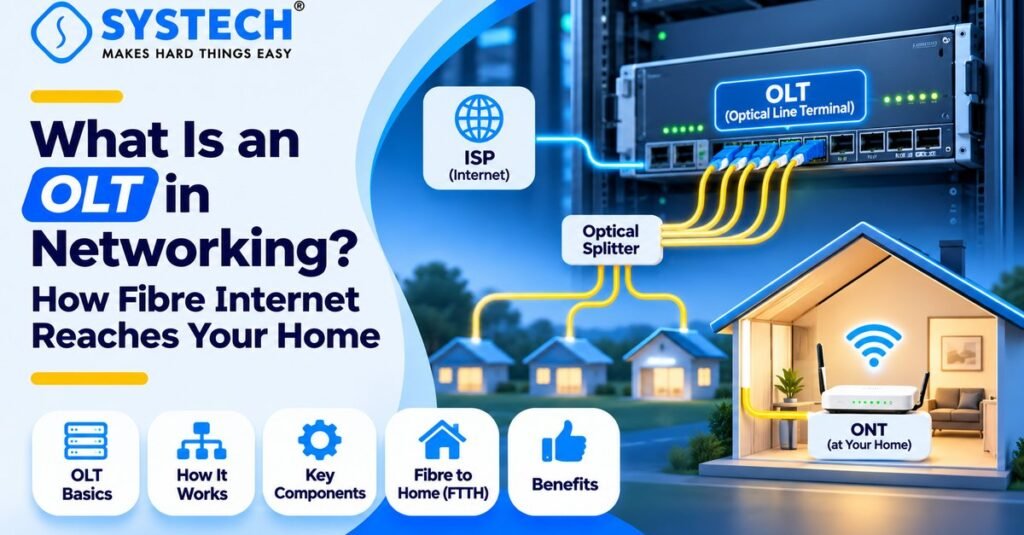
An Optical Line Terminal (OLT) is the main service-provider-side device in a Passive Optical Network (PON). It connects the ISP’s core or aggregation network to the fibre access network and manages communication with multiple customer-side Optical Network Units (ONUs) or Optical Network Terminals (ONTs).
In a typical FTTH network, data travels from the ISP core router to the OLT, through feeder fibre and passive optical splitters, and then along distribution and drop fibre to an ONU or ONT at the customer’s premises. The ONT converts the optical signal into an interface that a home router or other customer equipment can use.
The OLT also controls subscriber connections, coordinates upstream transmission, allocates bandwidth, applies service policies such as VLAN and QoS settings, and helps technicians monitor and manage customer-side equipment remotely.
Table of Contents
What Is an OLT in Networking?
OLT stands for Optical Line Terminal. It is a network device used at the service provider’s end of a Passive Optical Network. It acts as the central control point between the ISP’s core or aggregation network and the optical access network that serves homes, offices and other customer locations. Understanding fibre access infrastructure and network equipment is easier with hardware and networking training in Chennai covering fibre optics and broadband configuration.
Think of the OLT as the service provider’s central distribution and management point for fibre broadband. It does not simply split one cable into many. The passive optical splitter performs the physical branching. The OLT controls the PON system and coordinates traffic with the connected customer equipment.
Why is an OLT important?
It connects the ISP’s aggregation network to multiple fibre subscribers.
It manages and identifies connected ONUs/ONTs.
It coordinates upstream access so multiple subscribers can share the PON infrastructure.
It supports service configuration, bandwidth profiles, VLANs and QoS policies.
It provides operational visibility for monitoring optical links and subscriber equipment.
Where Is an OLT Installed?
An OLT is normally installed at an ISP central office, headend, exchange, data centre or another controlled aggregation site. Its uplink interfaces connect towards the provider’s core or aggregation network. Its PON interfaces connect to feeder fibres that lead into the Optical Distribution Network (ODN).
The OLT is generally not installed inside every customer’s home. The customer-premises device is usually an ONT or ONU. A home Wi-Fi router may connect to the ONT through Ethernet, although some ONTs include router and Wi-Fi functions in one device.
Typical location of each network element
What Is a PON and How Does FTTH Architecture Work?
A Passive Optical Network (PON) is a point-to-multipoint fibre access architecture. It uses optical fibre and passive components, especially optical splitters, to distribute connectivity from one OLT PON interface to multiple customer-side ONUs or ONTs. A passive splitter does not need a powered electronic switching function to divide the optical signal. Learners can strengthen their fibre networking knowledge through CCNA training in Trichy covering fibre optic cabling and network architecture.
FTTH means Fibre-to-the-Home. In an FTTH deployment, fibre reaches the customer’s home, where an ONT or ONU terminates the optical connection. The ONT then connects to the customer’s router or integrated gateway.
Basic FTTH network path
The brief’s FTTH architecture illustration on page 4 shows this same sequence: central office and OLT, feeder fibre, passive splitter and optical distribution network, drop cable to the home, ONT and finally the Wi-Fi router and connected devices.
What does the optical splitter do?
An optical splitter divides the optical power from one input fibre across multiple output fibres. Common split configurations include 1:8, 1:16, 1:32 and 1:64, depending on the network design and optical budget. A 1:64 splitter provides 64 output branches, but it does not create 64 independent full-capacity PON channels. The subscribers share the capacity and optical budget of the PON system.
Because the splitter is passive, it does not actively route packets or assign subscriber bandwidth. Those functions are handled by the OLT and the customer-side network equipment.
How Does an OLT Work? Downstream and Upstream Data Flow
The OLT coordinates traffic in both directions. Downstream means data travelling from the ISP towards subscribers. Upstream means data travelling from subscribers back towards the ISP.
Downstream: ISP to customer
The ISP core or aggregation network forwards subscriber data towards the OLT.
The OLT maps the traffic to the relevant PON service and transmits the downstream optical signal.
The feeder fibre carries the signal towards the optical distribution network.
Passive splitters distribute the optical signal to the connected branches.
The intended ONU/ONT receives the relevant traffic and converts the optical signal into customer-side network connectivity.
The home router distributes internet access to laptops, phones, televisions and other devices.
Upstream: customer to ISP
A customer device sends data through the home router to the ONT/ONU.
The ONT/ONU prepares the upstream transmission and sends it over the fibre access network.
Multiple ONUs share the upstream PON channel, so their transmissions must be coordinated to avoid collisions.
The OLT schedules upstream transmission opportunities, using the PON system’s ranging and bandwidth-allocation mechanisms.
The OLT receives the optical bursts, processes the traffic and forwards it towards the ISP network.
In time-division multiple access (TDMA)-based PON systems, upstream transmissions are scheduled in assigned time slots. The OLT coordinates when each ONU can transmit. Dynamic Bandwidth Allocation (DBA) allows the OLT to adjust upstream bandwidth assignments according to reported or observed demand and configured service profiles.
Why is upstream scheduling necessary?
If several ONUs transmitted upstream at the same time on the same shared channel without coordination, their signals could interfere. The OLT therefore coordinates transmission timing and allocates upstream opportunities. This makes it possible for multiple subscribers to use a shared optical access system efficiently.
Main Components of an OLT
An OLT is built from several hardware and software elements. The exact chassis design differs between vendors and models, but common components include control boards, PON line cards, uplink ports, power supplies, cooling systems and management interfaces. Understanding how network devices and infrastructure components work together is an important part of hardware and networking training in Trichy with practical equipment and infrastructure sessions
The hardware illustration on page 5 of the supplied brief shows a rack-mount OLT chassis with multiple optical interfaces and uplink connections. Actual port count, card layout and redundancy options depend on the selected platform.
Key Functions of an OLT
ONU/ONT registration and management
The OLT identifies and manages customer-side ONUs/ONTs connected to its PON interfaces. Depending on the platform, technicians can review registration status, provision services, inspect alarms and manage supported endpoint settings.
Dynamic Bandwidth Allocation (DBA)
DBA adjusts upstream transmission opportunities based on subscriber demand and configured service policies. It helps the OLT share available upstream capacity among ONUs while respecting service profiles and traffic priorities. DBA does not mean every subscriber receives the full PON line rate at the same time.
Traffic management and QoS
Quality of Service (QoS) policies help prioritise or manage different traffic classes. For example, an ISP may configure service profiles for voice, video and general internet traffic. The exact scheduling and QoS features depend on the PON standard and OLT vendor. Understanding enterprise traffic management and advanced network configuration is also useful through CCNP training in Trichy covering advanced routing and network technologies
VLAN and subscriber service configuration
The OLT can map subscriber services to VLANs and apply service-specific configuration. VLAN design helps providers separate or organise subscriber traffic and deliver different service types.
Optical and performance monitoring
Administrators can monitor alarms, interface status and supported optical measurements to help identify link degradation or equipment problems. Optical readings must be interpreted against the equipment’s specifications and the designed optical budget.
Remote provisioning and troubleshooting
Centralised management allows technicians to provision supported ONUs/ONTs, inspect connection status, apply configuration changes and diagnose certain faults without travelling to every customer location. Remote management capabilities vary by vendor, device model and management system.
Subscriber authentication and access control
The OLT and associated service-management systems can use configured identification and authentication mechanisms to control which customer-side devices are allowed to register and receive services. Security features and exact methods vary by platform.
OLT vs ONU vs ONT: What Is the Difference?
OLT, ONU and ONT are related terms, but they refer to different positions and functions in a fibre access network.
In everyday FTTH discussions, ONU and ONT are sometimes used loosely or interchangeably. In many deployments, ONT refers specifically to the customer-premises termination device. The exact terminology can vary by standard, vendor and network architecture.
Simple example
Imagine an ISP serving 64 homes from a PON port. The OLT is installed at the ISP site. A feeder fibre runs to a passive splitter, and the splitter branches the optical path towards the 64 customer locations. Each home has an ONT connected to its router. The OLT manages the PON connection and coordinates upstream traffic for the connected ONTs.
This is a simplified example, not a universal design rule. Actual split ratios and subscriber counts depend on the PON standard, optical power budget, service requirements and network planning.
GPON, EPON, XG-PON and XGS-PON Compared
An OLT can support different PON technologies. The technology determines the signalling method, line rates, interoperability requirements and the type of ONUs/ONTs that can connect.
These are nominal PON line rates, not guaranteed speeds for one customer. The capacity is shared across ONUs on the PON interface, and usable throughput is affected by protocol overhead, service configuration, split design, traffic demand and the ISP’s provisioning.
The brief’s page 5 table lists the common GPON, EPON, XG-PON and XGS-PON rates. The figures above use the nominal rates defined in the relevant standards, rounded for readability. ITU-T specifies XG-PON at approximately 10 Gbit/s downstream and 2.5 Gbit/s upstream, and XGS-PON at approximately 10 Gbit/s in both directions.
What does shared PON capacity mean?
If a PON port has a nominal downstream line rate of about 2.5 Gbit/s and serves multiple subscribers, that rate is the aggregate capacity of the PON channel—not a dedicated 2.5 Gbit/s connection for every home. The OLT manages how traffic is delivered across subscribers. Each customer’s retail speed plan is also constrained by the ISP’s service profile and wider network capacity.
GPON vs XGS-PON: when does the difference matter?
GPON is widely used for residential fibre access. XGS-PON offers a higher nominal line rate and symmetric downstream/upstream capacity, which can support higher-speed residential, business and mobile-backhaul services. An ISP must consider OLT support, ONT compatibility, optical coexistence, splitter design, optical power budget and migration costs before upgrading.
How an ISP Uses an OLT to Connect Multiple Homes
Consider an ISP deploying FTTH in a residential area. The ISP connects its aggregation network to an OLT. A PON port on the OLT connects to a feeder fibre, which reaches an optical distribution point. A passive splitter divides the optical signal into multiple branches. Distribution and drop fibres then connect the branches to customer premises. Wireless access and network connectivity concepts can be explored through CWNA training in Coimbatore covering wireless networking and access-point technologies
The page 7 illustration in the brief shows a GPON example in which a feeder fibre reaches a 1:64 splitter and branches towards multiple subscribers. It is a useful visual example of passive distribution, but a 1:64 split is not mandatory for every network.
OLT Management and Remote Subscriber Provisioning
One of the operational benefits of an OLT is centralised subscriber management. Instead of visiting each customer location for every routine service change, an ISP technician may be able to manage supported functions from the OLT or its network-management platform.
View connected and disconnected ONU/ONT devices.
Check registration status and supported optical measurements.
Apply or update subscriber service profiles.
Configure bandwidth profiles and traffic policies.
Assign VLANs or service mappings where supported.
Review alarms and event logs to identify possible fibre or equipment faults.
Perform supported remote configuration or software operations.
The source video specifically highlights viewing connected ONUs, monitoring customer connections, configuring bandwidth limits and managing customer-side equipment remotely. These are the operational themes to emphasise when explaining the value of OLT management to ISP technicians and local cable operators.
Remote management is not unlimited control over every customer device. Available operations depend on the OLT, ONU/ONT, management protocol, firmware and the ISP’s permissions and operational procedures.
Not sure which route fits you?
Tell us your stream and what you are hoping for, and we will tell you honestly which option suits.
Get course detailsCommon OLT and FTTH Troubleshooting Checks
Basic troubleshooting workflow for a technician
Confirm whether one subscriber, several subscribers or the entire PON port is affected.
Check OLT alarms and the registration state of the affected ONU/ONT.
Review optical signal readings and compare them with vendor limits and the network design.
Inspect the fibre path, patch cords, connectors and splitter connections using approved fibre-handling procedures.
Verify the subscriber’s VLAN, service profile, bandwidth settings and authentication/provisioning status.
Test the ONT Ethernet handoff and customer router separately to isolate the access-network fault.
Record the fault, measurements and corrective action before closing the ticket.
Never look directly into a fibre connector or optical port. Use suitable inspection and measurement equipment and follow the organisation’s fibre safety procedures.
OLT Deployment and Selection Considerations
An ISP should not select an OLT based only on the number of PON ports or advertised line rate. The equipment must fit the access-network design, subscriber growth plan and operational requirements.
PON technology compatibility: confirm GPON, EPON, XG-PON or XGS-PON support and matching ONUs/ONTs.
Subscriber capacity: plan port count, split ratios and expected utilisation rather than relying on a headline maximum.
Optical budget: calculate fibre, connector, splice and splitter losses against the supported optical class.
Uplink capacity: ensure the OLT uplinks can carry expected aggregate subscriber traffic.
Redundancy: assess power, control, uplink and chassis protection options where service availability requires them.
Management: review monitoring, provisioning, alarms, software lifecycle and integration with the ISP’s management platform.
Security: check access controls, management-plane protection, firmware updates and supported security features.
Expansion: consider future subscriber growth and migration to higher-capacity PON technologies.
Common OLT manufacturers
The supplied brief names Huawei, ZTE, Nokia, FiberHome and TP-Link as examples of manufacturers in the OLT market. Product availability and supported standards vary by model and region, so technicians should check the vendor’s official datasheets and interoperability requirements before selecting equipment.
Frequently asked questions
What is an OLT in networking?
An OLT (Optical Line Terminal) is the central service-provider-side device in a Passive Optical Network. It connects the ISP network to the fibre access network and manages connected ONUs or ONTs.
What is the full form of OLT?
OLT stands for Optical Line Terminal.
Where is an OLT installed?
It is generally installed at an ISP central office, headend, exchange, data centre or another network aggregation location.
How does an OLT work in FTTH?
It sends and receives optical traffic over the PON, coordinates connected ONUs/ONTs and manages subscriber services. Passive splitters distribute the optical signal towards customer premises.
What is the difference between OLT and ONU?
The OLT is the central device at the ISP side. An ONU is customer-side optical network equipment that terminates the PON connection and provides network connectivity.
What is the difference between ONU and ONT?
Both are customer-side optical network devices. ONT commonly refers to the termination device at the customer premises, while ONU is a broader term used in PON architecture. Terminology varies by vendor and deployment.
What is a GPON OLT?
A GPON OLT is an Optical Line Terminal that supports Gigabit-capable Passive Optical Network technology, with nominal line rates of about 2.488 Gbit/s downstream and 1.244 Gbit/s upstream.
Does an optical splitter need power?
A passive optical splitter does not require electrical power to divide optical power across its output fibres. It does introduce optical loss that must be included in the network budget.
Does a 1:64 splitter provide 2.5 Gbps to every user?
No. A splitter shares the PON optical channel across its branches. The PON line rate is aggregate capacity, not a dedicated rate for every connected subscriber.
Can an ISP manage ONTs remotely through an OLT?
Yes, supported OLT and ONT platforms allow central monitoring and provisioning functions. The available controls depend on the vendor, device compatibility, management system and permissions.
Final Thoughts
The OLT is a central part of the fibre broadband access network. It connects the ISP’s core or aggregation network to multiple customer-side ONUs and ONTs through a Passive Optical Network. The optical splitter distributes the fibre path, while the OLT coordinates traffic, manages subscriber equipment and applies service policies.
For networking students and ISP technicians, understanding the relationship between the OLT, optical splitter, ONU/ONT and home router makes FTTH architecture much easier to troubleshoot. It also helps explain why PON line rates are shared across subscribers and why optical budgets, service profiles and remote management matter in a real deployment.
Written by
Leo Antony Raj
Senior Trainer · Networking, Cyber Security and Cloud
Leo Antony Raj has over 20 years of hands-on experience in hardware, networking, server configuration, ethical hacking and cloud computing. He has trained more than 10,000 students, and he teaches networking first, because every security and cloud role is built on it.