
By Leo Antony Raj, Senior Trainer, Systech Group 20+ years in networking and cybersecurity · Updated November 2026.
6 Min read
In short
To prevent rogue DHCP servers on a Cisco network, enable DHCP Snooping globally and for the required VLANs, configure only the authorized DHCP server-facing interface as trusted, and keep employee-facing ports untrusted. Verify the configuration using show ip dhcp snooping and show ip dhcp snooping binding to help protect network devices from unauthorized IP address assignments.
Table of Contents
Introduction
Imagine a company with 500 computers, laptops, printers and other network devices. The company uses one authorized DHCP server to assign IP addresses to all these systems. One day, an employee installs a DHCP server application on their computer and connects it to the company network without permission.
This creates a security risk. The unauthorized server may respond to client requests before the genuine DHCP server and assign incorrect network settings to employees’ computers.
How can a network administrator prevent this problem without manually configuring IP addresses on all 500 systems?
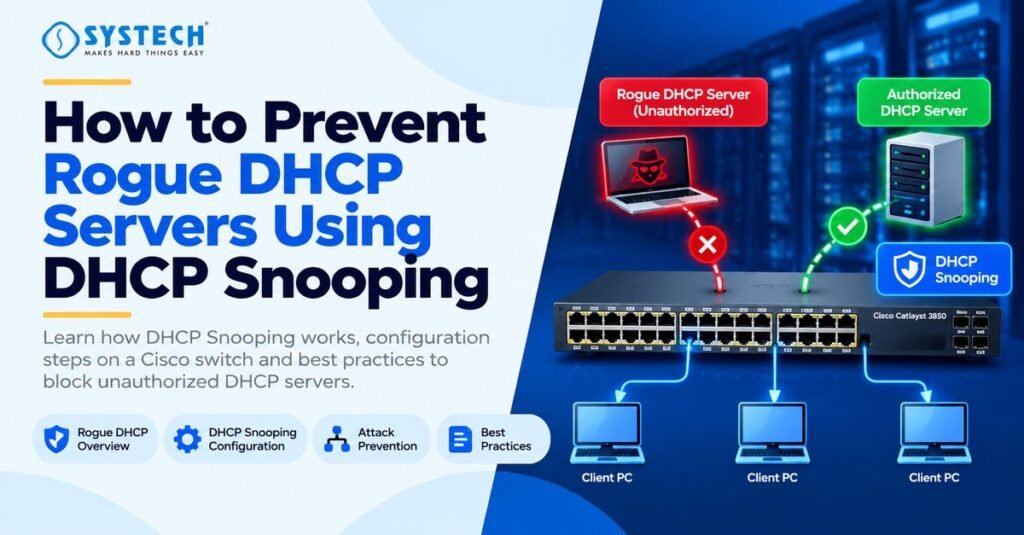
The answer is DHCP Snooping. It is a security feature available on supported Cisco switches that checks DHCP traffic and blocks unauthorized DHCP server messages received through untrusted Layer 2 interfaces.
If you are learning network configuration and security, understanding DHCP Snooping is an important part of CCNA networking training in Chennai, because it connects DHCP operation, switching and network security in a practical way.
In this guide, you will learn how rogue DHCP servers work, how to configure DHCP Snooping on a Cisco switch, how to verify the configuration, and how to troubleshoot common problems.
What Is a Rogue DHCP Server?
A rogue DHCP server is an unauthorized DHCP server that provides IP configuration information to devices on a network.
A normal DHCP server assigns information such as:
IP address
Subnet mask
Default gateway
DNS server addresses
Lease duration
A rogue DHCP server can provide incorrect values for these settings. For example, it might assign an incorrect default gateway or a malicious DNS server.
The affected computer may then lose network connectivity or send traffic through an unauthorized device.
Example of a Rogue DHCP Server Attack
When an employee’s computer broadcasts a DHCP request, both the authorized and rogue servers may receive it. If the rogue server responds first, the client may accept its offer.
The result depends on the DHCP messages received and the client’s selection process. A rogue server does not automatically win every time, but it can create serious network problems.
For example, a malicious server could supply a false gateway address. This may allow an attacker to redirect traffic or attempt a man-in-the-middle attack.
The important point is that a computer connected to the company network should not be allowed to provide unauthorized DHCP server responses.
What Is DHCP Snooping?
DHCP Snooping is a Layer 2 security feature that examines DHCP messages entering a supported switch and applies trust rules to control which interfaces may supply DHCP server responses.
It divides switch interfaces into two categories:
Trusted ports: Interfaces permitted to receive DHCP server messages from authorized DHCP servers or legitimate network paths.
Untrusted ports: Interfaces where DHCP server messages are restricted. Employee computers and other ordinary client devices should normally connect through untrusted ports.
By default, Cisco DHCP Snooping interfaces are generally untrusted when the feature is enabled. The network administrator must identify the legitimate DHCP server path and configure trust appropriately.
When a rogue DHCP server sends a DHCP Offer through an untrusted port, the switch can drop the unauthorized response instead of forwarding it to clients.
How DHCP Snooping Works
The process follows these steps:
A client sends a DHCP Discover message to find an available DHCP server.
The authorized DHCP server receives the request and prepares a DHCP Offer.
The Cisco switch checks DHCP messages against its configured trust rules.
DHCP server messages arriving through an untrusted Layer 2 port are blocked.
Valid server responses arriving through the appropriate trusted interface can reach the client.
The switch builds a DHCP Snooping binding database from eligible DHCP exchanges.
This binding database can record the client’s MAC address, assigned IP address, VLAN, lease information and associated interface.
The information can also support other switch security features, including Dynamic ARP Inspection and IP Source Guard, when those features are configured.
Important: DHCP Snooping does not replace a firewall, endpoint security or access control. It provides a specific protection against unauthorized DHCP traffic.
Why Is DHCP Snooping Important in a Company with 500 Systems?
In a company with hundreds of network devices, manually checking every computer for unauthorized DHCP software is difficult. DHCP Snooping helps enforce the network administrator’s DHCP trust policy at the switch.
Without suitable protection, a rogue server can cause several problems.
1. Incorrect IP Address Assignment
A rogue DHCP server may assign an address from the wrong subnet or provide an invalid subnet mask. The computer may then fail to communicate with other systems.
2. Incorrect Default Gateway
An attacker may advertise a gateway controlled by an unauthorized device. If a client accepts the settings and traffic is redirected through that device, the attacker may attempt to intercept communications.
3. Incorrect DNS Configuration
A malicious DHCP response may advertise an unauthorized DNS server. This can expose users to DNS manipulation or attempts to redirect them to fraudulent websites.
4. Network Connectivity Problems
Two DHCP servers may provide conflicting settings or assign addresses from overlapping address pools. This can lead to intermittent connectivity and difficult troubleshooting.
5. Increased Security Risk
An attacker may use rogue DHCP responses as part of a broader network attack. DHCP Snooping reduces this risk by restricting unauthorized server messages at the switch.
For companies managing many devices, this protection is useful because it applies at the network access layer rather than relying only on individual users to follow security policies.
How to Configure DHCP Snooping on a Cisco Switch
The following example uses a Cisco IOS-style Layer 2 switch configuration. The exact commands and supported features can vary by switch model and software version.
Example Network Setup
Assume the network has the following configuration:
The interface numbers are examples. Replace them with the actual interfaces in your network.
The goal is to enable DHCP Snooping for VLAN 10, trust the interface connected to the authorized DHCP server, and leave employee-facing ports untrusted.
Step 1: Enable DHCP Snooping Globally
Enter privileged EXEC mode and open global configuration mode.
Switch> enable
Switch# configure terminal
Switch(config)# ip dhcp snooping
This enables DHCP Snooping on the switch.
Enabling the feature globally does not, by itself, mean that every VLAN is protected. You must also enable it for the required VLANs.
Step 2: Enable DHCP Snooping for VLAN 10
Enter the following command:
Switch(config)# ip dhcp snooping vlan 10This enables DHCP Snooping for VLAN 10.
If the company uses multiple VLANs, include the VLANs that require protection. For example:
Switch(config)# ip dhcp snooping vlan 10,20,30Do not assume that enabling DHCP Snooping for one VLAN automatically protects all other VLANs.
Step 3: Configure the Authorized DHCP Server Port as Trusted
If the authorized DHCP server connects directly to GigabitEthernet1/0/24, configure that interface as trusted.
Switch(config)# interface GigabitEthernet1/0/24
Switch(config-if)# ip dhcp snooping trust
Switch(config-if)# exit
This allows legitimate DHCP server messages to enter through the designated trusted interface.
If the server is located on another switch or network segment, identify the actual path that DHCP server responses follow. Depending on the topology, the relevant trusted interface may be a legitimate uplink or a port connected to a DHCP relay path.
Do not mark a port trusted merely because it is an uplink. Trust only interfaces that need to carry legitimate DHCP server traffic and are under administrative control.
Step 4: Keep Employee Ports Untrusted
Employee-facing interfaces should remain untrusted.
For example:
Switch(config)# interface GigabitEthernet1/0/5
Switch(config-if)# no ip dhcp snooping trust
Switch(config-if)# exit
The no ip dhcp snooping trust command explicitly removes the trust setting from that interface.
When DHCP Snooping is enabled, interfaces are generally untrusted by default, so this command is mainly useful for making the intended security policy explicit.
If an employee connects a rogue DHCP server to this port, DHCP server messages received through that untrusted Layer 2 interface can be blocked by DHCP Snooping.
Step 5: Apply DHCP Rate Limiting Where Appropriate
You can also limit the rate of DHCP packets arriving on an untrusted port to help protect against excessive DHCP traffic.
For example:
Switch(config)# interface GigabitEthernet1/0/5
Switch(config-if)# ip dhcp snooping limit rate 10
Switch(config-if)# exit
On supported Cisco platforms, this example limits DHCP traffic on the interface to 10 packets per second.
Caution: Rate limits are platform-dependent and should be selected according to the environment. Configure an appropriate limit for legitimate clients, access points, phones or other devices that may generate DHCP traffic. An unsuitable limit can interrupt legitimate DHCP operation.
Step 6: Verify the Configuration
After completing the configuration, return to privileged EXEC mode.
Switch(config)# end
Switch# show ip dhcp snooping
Check the output for the following:
DHCP Snooping is enabled.
VLAN 10 appears in the list of VLANs enabled for DHCP Snooping.
The authorized DHCP server-facing interface is trusted.
Employee-facing interfaces remain untrusted.
You can also check the DHCP Snooping binding database:
Switch# show ip dhcp snooping bindingThis command displays available DHCP Snooping bindings, including information such as IP addresses, MAC addresses, VLANs and interfaces.
For additional troubleshooting, use:
Switch# show ip dhcp snooping statisticsThe exact command availability and output vary by Cisco platform. Consult the documentation for the switch model and software version in use.
How to Test Whether DHCP Snooping Blocks a Rogue DHCP Server
A configuration should be verified through an authorized test rather than assumed to work because the commands were accepted.
Use a lab environment or an approved maintenance window. Do not connect an unapproved DHCP server to a production network to test the protection.
Test Scenario
Suppose an employee-facing interface is GigabitEthernet1/0/5, and the authorized DHCP server’s path enters through GigabitEthernet1/0/24.
Perform the following checks:
Confirm that DHCP Snooping is enabled globally.
Confirm that the test client’s VLAN is included in the DHCP Snooping configuration.
Confirm that the employee-facing interface is untrusted.
Confirm that the legitimate DHCP server path is trusted where required.
Use an authorized lab DHCP server to generate DHCP traffic from an untrusted interface.
Inspect switch statistics and logs for DHCP messages dropped by the configured security rules.
Verify that a legitimate client can still obtain the correct IP address, gateway and DNS settings.
A rogue DHCP Offer received on an untrusted Layer 2 interface should be blocked under the applicable DHCP Snooping rules.
Do not rely only on the client receiving an IP address as proof of success. The client could receive an address from the wrong server. Verify the DHCP server identity, supplied network settings, switch trust configuration and relevant counters.
Common DHCP Snooping Problems and Solutions
Even when the configuration looks correct, DHCP Snooping may affect legitimate DHCP traffic if the switch’s trust policy does not match the actual network topology.
Troubleshooting Checklist
Use the following commands on supported Cisco IOS-style switches:
show ip dhcp snooping
show ip dhcp snooping binding
show ip dhcp snooping statistics
show running-config
Review the output and identify the interface where the DHCP response enters the switch. This is often the key to finding a trust-policy mistake.
If the network uses multiple switches, VLAN trunks or DHCP relay agents, check the full path rather than changing trust settings on only one interface.
Cisco’s current platform documentation should be used to confirm the commands and behaviour for the particular switch model and software release.
Best Practices for DHCP Snooping in Enterprise Networks
For a network with 500 systems, DHCP Snooping should be part of a wider network security policy.
1. Trust only authorized interfaces: Keep client-facing ports untrusted and allow legitimate server messages only through the required, controlled network paths.
2. Protect every relevant VLAN: Review all user, wireless and other client VLANs that require protection.
3. Review configuration changes: When adding a switch, DHCP server or VLAN, update the trust policy and test DHCP connectivity.
4. Monitor DHCP Snooping statistics: Review dropped packet counters and logs to identify possible rogue DHCP activity or configuration mistakes.
5. Use DHCP Snooping with other security controls: On supported platforms, consider Dynamic ARP Inspection and IP Source Guard, along with port security, network access controls and appropriate monitoring.
6. Document the authorized DHCP architecture: Record approved DHCP servers, relay agents, VLANs, switch interfaces and responsible administrators.
7. Test after every important change: Confirm that authorized clients receive the expected settings and that unauthorized DHCP server responses are blocked.
These practices help administrators reduce DHCP-related risks without disrupting normal network operation.
Not sure which route fits you?
Tell us your stream and what you are hoping for, and we will tell you honestly which option suits.
Get course detailsDHCP Snooping vs. Dynamic ARP Inspection vs. IP Source Guard
These Cisco security features are related, but each serves a different purpose.
DHCP Snooping is a useful starting point because its binding database can provide information to the other two features.
However, these features are not interchangeable. DHCP Snooping does not inspect every kind of network attack, and enabling it alone does not automatically enable DAI or IP Source Guard.
Understanding how these protections work together is useful when studying network security and preparing for practical troubleshooting exercises.
Learn Network Security Through Practical Training
Preventing rogue DHCP servers is not just about remembering a Cisco command. A network administrator must understand DHCP message flow, VLANs, switch interfaces, trusted network paths and the security risks created by incorrect IP configuration.
For learners who want to practise these concepts, CCNA Course in Coimbatore provides a relevant path for building networking and switching knowledge.
For a broader understanding of network attacks, defensive controls and security monitoring, explore the Cybersecurity Course in Chennai.
Conclusion
DHCP Snooping is an important security feature for preventing rogue DHCP servers from supplying unauthorized network settings to client devices. By enabling it globally, applying it to the required VLANs, trusting only legitimate DHCP paths and keeping employee-facing ports untrusted, administrators can reduce the risk of DHCP-based attacks.
For a company with 500 systems, the next step is to verify the configuration across the actual network topology and confirm that legitimate DHCP services continue to work correctly. Monitoring, documentation and regular security testing help maintain that protection over time.
To build practical knowledge of network attack techniques and defensive controls, explore Systech Group’s Ethical Hacking Course in Chennai
Frequently asked questions
Which Cisco switch feature prevents rogue DHCP servers?
DHCP Snooping helps prevent rogue DHCP servers by blocking unauthorized DHCP server messages received through untrusted Layer 2 interfaces.
What is the main difference between a trusted and an untrusted port?
A trusted port is permitted to receive legitimate DHCP server traffic, while an untrusted port restricts server messages to prevent unauthorized DHCP responses.
Should all switch uplink ports be trusted?
No. Trust should be applied only where necessary for legitimate DHCP traffic. Administrators must evaluate the network topology and DHCP server or relay path before trusting an uplink.
Does DHCP Snooping protect every VLAN automatically?
No. On Cisco IOS-style switches, administrators generally enable DHCP Snooping globally and specify the VLANs that require protection.
Can DHCP Snooping stop every type of DHCP attack?
No. It is designed to enforce DHCP trust rules and block certain unauthorized DHCP messages. Additional controls may be needed to address other DHCP-related attacks and broader network threats.
Which command verifies DHCP Snooping?
On supported Cisco IOS-style switches, use show ip dhcp snooping to inspect the configuration, show ip dhcp snooping binding to view learned bindings, and show ip dhcp snooping statistics to inspect packet statistics.
What happens if the legitimate DHCP server is connected to an untrusted port?
Legitimate server responses may be dropped, preventing clients from receiving IP addresses. The administrator should identify the actual DHCP response path and configure the appropriate interface as trusted.
Is DHCP Snooping useful for CCNA preparation?
Yes. DHCP Snooping connects DHCP services, VLANs, switch interfaces and network security. Practising it in a controlled lab helps learners understand both configuration and troubleshooting.

Written by
Leo Antony Raj
Senior Trainer · Networking, Cyber Security and Cloud
Leo Antony Raj has over 20 years of hands-on experience in hardware, networking, server configuration, ethical hacking and cloud computing. He has trained more than 10,000 students, and he teaches networking first, because every security and cloud role is built on it.